1. 개발 과정
1. 폴더 세팅
mkdir (프로젝트명): 만들 프로젝트 폴더 생성npm init -y: 모두 yes로npm init실행
2. 실행 명령어 작성
-
package.json에 bin 설정"bin": { "create-guesung-app": "./bin/generate-app.js" },기존 스크립트에 위 bin스크립트를 추가합니다.
create-guesung-app가 바로 우리가 패키지를 다운로드할 때 치는 명령어입니다. e.g.npx create-guesung-app -
bin/generate-app.js파일 작성이 패키지를 설치할 때,
bin/genreate-app.js파일이 실행됩니다.-
bin/generate-app.js
#! /usr/bin/env node

"use strict";

const { execSync } = require("child_process");
const path = require("path");
const fs = require("fs");
if (process.argv.length < 3) {
  console.log("You have to provide a name to your app.");
  console.log("For example :");
  console.log("    npx create-my-boilerplate my-app");
  process.exit(1);
}

const projectName = process.argv[2];
const currentPath = process.cwd();
const projectPath = path.join(currentPath, projectName);
const GIT_REPO = YOUR_GIT_REPO // 이 부분

if (projectName !== ".") {
  try {
    fs.mkdirSync(projectPath);
  } catch (err) {
    if (err.code === "EEXIST") {
      console.log(projectName);
      console.log(
        `The file ${projectName} already exist in the current directory, please give it another name.`
      );
    } else {
      console.log(error);
    }
    process.exit(1);
  }
}

async function main() {
  try {
    console.log("Downloading files...");
    execSync(`git clone --depth 1 ${GIT_REPO} ${projectPath}`);

    if (projectName !== ".") {
      process.chdir(projectPath);
    }

    console.log("Installing dependencies...");
    execSync("npm install");

    console.log("Removing useless files");
    execSync("npx rimraf ./.git");

    console.log("The installation is done, this is ready to use !");
  } catch (error) {
    console.log(error);
  }
}

main();
-
YOUR_GIT_REPO에는 위에서 clone하고 싶은 repository의 git을 작성하면 됩니다.
저같은 경우는 제가 미리 만들어준 boiler-plate-vite-react를 작성했습니다.
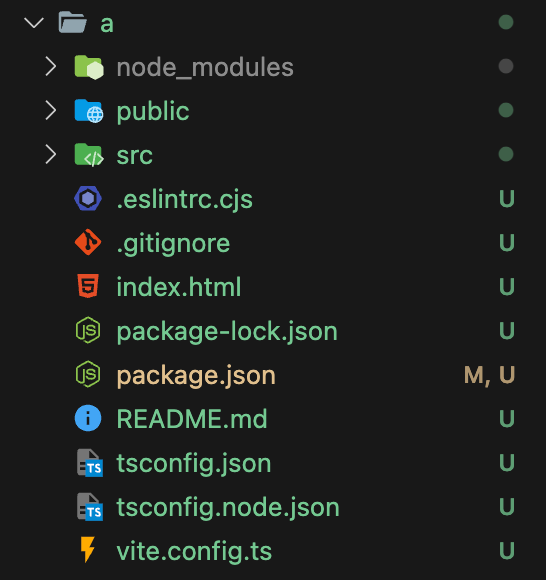
3. npx create-guesung-app

2. 배운 점 / 느낀 점
-
bin : 패키지를 설치하면 실행하는 파일
"bin" : {"myapp":"./cli.js"}- myapp을 설치할 때, cli.js파일에 대한 심볼릭 링크가 만들어진다.
이 bin파일에 작성하는 코드에 따라 유저가 어떤 boilerplate코드를 다운로드할 수 있고 그런 것을 설정할 수 있어서 활용성이 무궁무진하다고 생각했다. 나중에, 라이브러리를 만들게 되었을 때 활용을 해봐야겠다.