1. Next.js + Typescript + TailwindCSS + yarn PNP
1. yarn berry + pnp + zero-install 기반의 프로젝트 세팅
-
yarn set version berry -
.yarnrc.ymlenableGlobalCache: false nodeLinker: pnp yarnPath: .yarn/releases/yarn-4.1.0.cjs -
.gitignore-
zero-install : cache파일을 업로드하고, .pnp파일(cache에 대한 의존성 정보)을 업로드하지 않는다.
# /.gitignore

.yarn/*
!.yarn/cache
!.yarn/patches
!.yarn/plugins
!.yarn/releases
!.yarn/sdks
!.yarn/versions
-
- non zero-install : cache파일을 업로드하지 않고, .pnp를 업로드한다.
# /.gitignore

.pnp.*
.yarn/*
!.yarn/cache
!.yarn/patches
!.yarn/plugins
!.yarn/releases
!.yarn/sdks
!.yarn/versions
yarn installyarn dlx @yarnpkg/sdks vscode- VSCode편집기를 위한 yarn berry의 SDK설치
select typescript version > workspace version
2. tailwindcss
prettier-plugin-tailwindcss
3. eslint
https://velog.io/@xmun74/Next.js-TS에서-ESLint-Prettier-설정하기
설치 모듈
eslint: ESLint의 핵심 라이브러리로, JavaScript 및 JSX 코드의 문법적 오류와 스타일 가이드를 검사- 코드 품질과 일관성을 유지하는 데 필수적
eslint-config-airbnb: Airbnb의 Javascript 스타일 가이드를 따르는 ESLint 설정eslint-config-next: Next 프로젝트를 위한 ESLint 설정eslint-config-prettier: Prettier와 ESLint사이의 스타일 충돌을 방지- 코드 포맷팅 시 prettier의 규칙을 우선시
eslint-plugin-prettier: prettier를 ESLint의 규칙으로 실행하여 코드 포맷팅 문제를 ESLint오류로 보고eslint-plugin-import: import/export 문법을 검사하고 오류를 찾아준다- 불필요한 import를 줄이고, 경로 오류를 방지
eslint-plugin-json-format: JSON파일의 포맷을 검사하고 일관된 스타일 유지eslint-plugin-jsx-a11y: JSX요소의 접근성 문제를 검사eslint-plugin-react: react특유의 코드 패턴 검사eslint-plugin-react-hooks: react hooks 사용에 대한 규칙 검사eslint-plugin-simple-import-sort: import문을 자동으로 정렬eslint-plugin-unused-imports: 사용되지 않는 import를 찾아내고, 자동으로 제거@typescript-eslint/eslint-plugin: TS코드의 특정 패턴과 규칙을 검사@typescript-eslint/parser: TS코드를 분석하기 위한 ESLint 파서
설치 명령어
yarn add -D eslint eslint-config-airbnb eslint-config-next eslint-config-prettier eslint-plugin-import eslint-plugin-json-format eslint-plugin-jsx-a11y eslint-plugin-prettier eslint-plugin-react eslint-plugin-react-hooks eslint-plugin-simple-import-sort eslint-plugin-unused-imports @typescript-eslint/eslint-plugin @typescript-eslint/parser.eslintrc.json
{
  "parser": "@typescript-eslint/parser",
  "plugins": [
    "@typescript-eslint",
    "unused-imports",
    "react-hooks",
    "prettier"
  ],
  "extends": [
    "airbnb",
    "plugin:import/errors",
    "plugin:import/warnings",
    "plugin:prettier/recommended",
    "plugin:@typescript-eslint/recommended"
  ],
  "rules": {
    "import/prefer-default-export": 0, // 0 -> 0ff / 1 -> on (default)
    "jsx-a11y/no-noninteractive-element-interactions": 0,
    "prettier/prettier": 0,
    "import/extensions": 0,
    "no-use-before-define": 0,
    "import/no-unresolved": 0,
    "import/no-extraneous-dependencies": 0, // 테스트 또는 개발환경을 구성하는 파일에서는 devDependency 사용을 허용
    "no-shadow": 0,
    "react/prop-types": 0,
    "react/require-default-props": "off",
    "react/react-in-jsx-scope": 0,
    "react/jsx-props-no-spreading": 0,
    "react/jsx-filename-extension": [
      2,
      { "extensions": [".js", ".jsx", ".ts", ".tsx"] }
    ],
    "unused-imports/no-unused-imports": "error",
    "react/no-unstable-nested-components": 0,
    "unused-imports/no-unused-vars": [
      "warn",
      {
        "vars": "all",
        "varsIgnorePattern": "^_",
        "args": "after-used",
        "argsIgnorePattern": "^_"
      }
    ],
    "@typescript-eslint/consistent-type-imports": "error",
    "react/function-component-definition": 0,
    "react/destructuring-assignment": 0,
    "@typescript-eslint/prefer-namespace-keyword": 0,
    // for emotion
    "react/no-unknown-property": ["error", { "ignore": ["css"] }],
    "jsx-a11y/anchor-is-valid": [
      // nextjs 에서 a tag 에 href 를 기대하는 이슈로 인해
      "error",
      {
        "components": ["Link"],
        "specialLink": ["hrefLeft", "hrefRight"],
        "aspects": ["invalidHref", "preferButton"]
      }
    ],
    "no-underscore-dangle": 0,
    "react-hooks/rules-of-hooks": "error",
    "react-hooks/exhaustive-deps": "error"
  }
}
3. prettier
.prettierrc
{
  "arrowParens": "avoid",
  "bracketSpacing": true,
  "htmlWhitespaceSensitivity": "css",
  "insertPragma": false,
  "jsxBracketSameLine": false,
  "jsxSingleQuote": false,
  "printWidth": 80,
  "proseWrap": "preserve",
  "quoteProps": "as-needed",
  "requirePragma": false,
  "semi": true,
  "singleQuote": false,
  "tabWidth": 2,
  "trailingComma": "none",
  "useTabs": false,
  "endOfLine": "lf",
  "plugins": [
    "prettier-plugin-tailwindcss"
  ]
}
.prettierignore
.vscode/
.next/
.yarn/
.DS_Store
.pnp.cjs
.pnp.loader.mjs
4. .github 설정
- PR Template
pull_request_template.md
## 💡 왜 PR을 올렸나요?

<!-- 예: 이슈대응, 신규피쳐, 리팩토링 ... -->

- 신규 피처

## 💁 무엇이 어떻게 바뀌나요?

1.
2.
3.- CODEOWNERS : 코드 주인
CODEOWNERS
@guesung트러블 슈팅
1. yarn berry 세팅 후, 100MB초과 에러
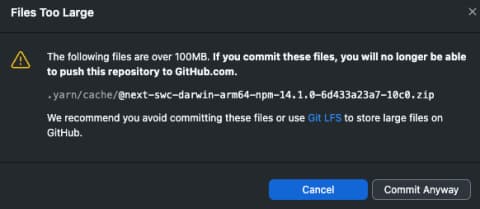
commit Anywary를 수행해도, push할 때 막힌다.
원인
: 에러 메시지에 적혀있는 대로, 파일 크기가 100MB를 초과했기 때문이다. yarn berry로 세팅(yarn set version berry) 후, pnp로 git에 commit을 할 경우 위와 같은 에러 메시지가 뜬다.
해결 방법
-
brew install git-lfs: LFS 설치 -
git lfs track “.yarn/**” : 추적할 파일에 .yarn/**을 추가한다.
-
github 설정 변경
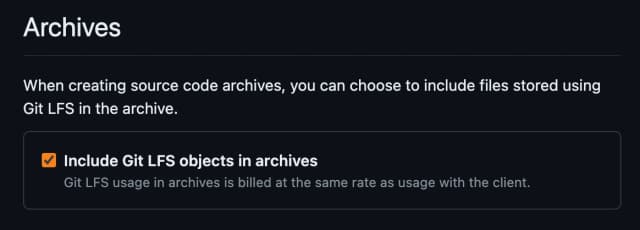
Include Git LFS objects in archives옵션을 활성화한다.
2. prettier-plugin-tailwindcss가 pnp와 호환되지 않는다.
이슈
아직 해결되지 않은 이슈이다.
이 prettier-plugin-tailwindcss 하나로 인해 pnp에서 node_modules로 바꾸는 게 맞을까?