1. 스팩 정의
기능 스팩
- 명령어를 입력하면 즉시 폴더과 파일을 일괄 생성을 한다.
개발 스팩
- javascript를 주로 사용하는 개발자로써, node.js를 활용하고 싶다.
2. 개발
개발 구상
-
node.js에는 파일이나 폴더를 생성하고 제거할 수 있는 fs모듈과 path모듈을 제공한다.
💡 fs?
: FileSystem, Node.js에서 제공하는 FileSystem 모듈
-
파일 입출력 처리할 때 사용한다.
-
Node.js에 내장되어 있기 때문에 별도의 라이브러리 설치없이 바로 불러와서 사용할 수 있다.
const fs = require('fs'); // CommonJS Module 환경 import fs from 'fs'; // ECMAScript Module 환경- CommonJS Module vs ECMAScript Module : Javascript 모듈 시스템 : Javascript CommonJS vs ES Module
-
동기 메서드는 Sync접미사가 붙고, 비동기 메서드는 접미사가 없다.
-
자세한 내용 : Node.js fs, path 모듈
💡 path?
: 파일이나 폴더의 경로를 다루 때 사용한다.
-
-
fs에서 사용할 메서드를 찾아보자.
fs.existsSync: 동기적으로 해당 폴더가 존재하는 지 체크한다.
fs.mkdriSync: 동기적으로 폴더를 만든다.fs.writeFileSync: 동기적으로 파일을 만든다.- 인자 1 : 경로
- 인자 2 : 파일에 넣을 내용
- path에서 사용할 메서드를 찾아보자.
path.join: 인자로 받은 경로들을 하나로 합쳐서 문자열 형태로 리턴한다.
개발
1. 폴더명 리스트 만들기
const folders = [
  "trace-and-find-g-1", "trace-and-find-g-2", "trace-and-find-h-1", "trace-and-find-h-2",
  "trace-and-find-i-1", "trace-and-find-i-2", "listen-and-repeat-g", "listen-and-repeat-h",
	..
];
folders.forEach(folder => {
	// ..
})
폴더명 리스트는 GPT에게 리스트를 대충 던져주면 잘 짜준다.
2. 만들 파일의 경로 설정하기
1번에서 폴더명 리스트를 순회하며 하나씩 폴더들 만들 것이다. 아래 코드는 전부 folders.forEach(folder ⇒ { }) 내부의 코드이다.
const folderPath = path.join(__dirname,folder);💡
__dirname?: 현재 폴더의 절대 경로
3. 폴더 만들기
fs.mkdirSync(folderPath);2.1.번에서 만든 폴더 경로에 폴더를 만들어준다.
4. 컴포넌트명 만들기 (PascalCase)
PascalCase는 문자 사이사이의 첫 번째 단어가 대문자라는 특징이 있다. 그래서, 첫 번째 단어를 모두 대문자로 만들어줄 것이다.
const getPascalCase = (str:string) => str.split('-').map(word => word.charAt(0).toUpperCase() + word.slice(1)).join('');5. 컴포넌트에 넣을 내용 만들기
const componentContent = `
export default function ${componentName}() {
	return <div></div>;
}
`;
const indexContent = `export { default as ${componentName} } from './${folder}';`;6. 4번의 컴포넌트명 + 5번의 내용으로 파일 만들기
이제, 위에서 만든 폴더에 파일을 삽입할 것이다.
fs.writeFileSync(path.join(folderPath, `${componentName}.tsx`), componentContent);
fs.writeFileSync(path.join(folderPath, 'index.ts'), indexContent);
전체 코드
const fs = require('fs');
const path = require('path');

const folders = [
  "trace-and-find-g-1", "trace-and-find-g-2", "trace-and-find-h-1", "trace-and-find-h-2",
  "trace-and-find-i-1", "trace-and-find-i-2", "listen-and-repeat-g", "listen-and-repeat-h",
  // ..
];

const getPascalCase = (str) => str.split('-').map(word => word.charAt(0).toUpperCase() + word.slice(1)).join('');

folders.forEach(folder => {
    const folderPath = path.join(__dirname, folder);
    if (!fs.existsSync(folderPath)) {
        fs.mkdirSync(folderPath);
    }

    const componentName = getPascalCase(folder)

    const componentContent = `
    export default function ${componentName}() {
          return <div></div>;
        }
`;

    const indexContent = `export { default as ${componentName} } from './${folder}';`;

    fs.writeFileSync(path.join(folderPath, `${componentName}.tsx`), componentContent);
    fs.writeFileSync(path.join(folderPath, 'index.ts'), indexContent);
});

console.log("Folders and component files created successfully.");
결과
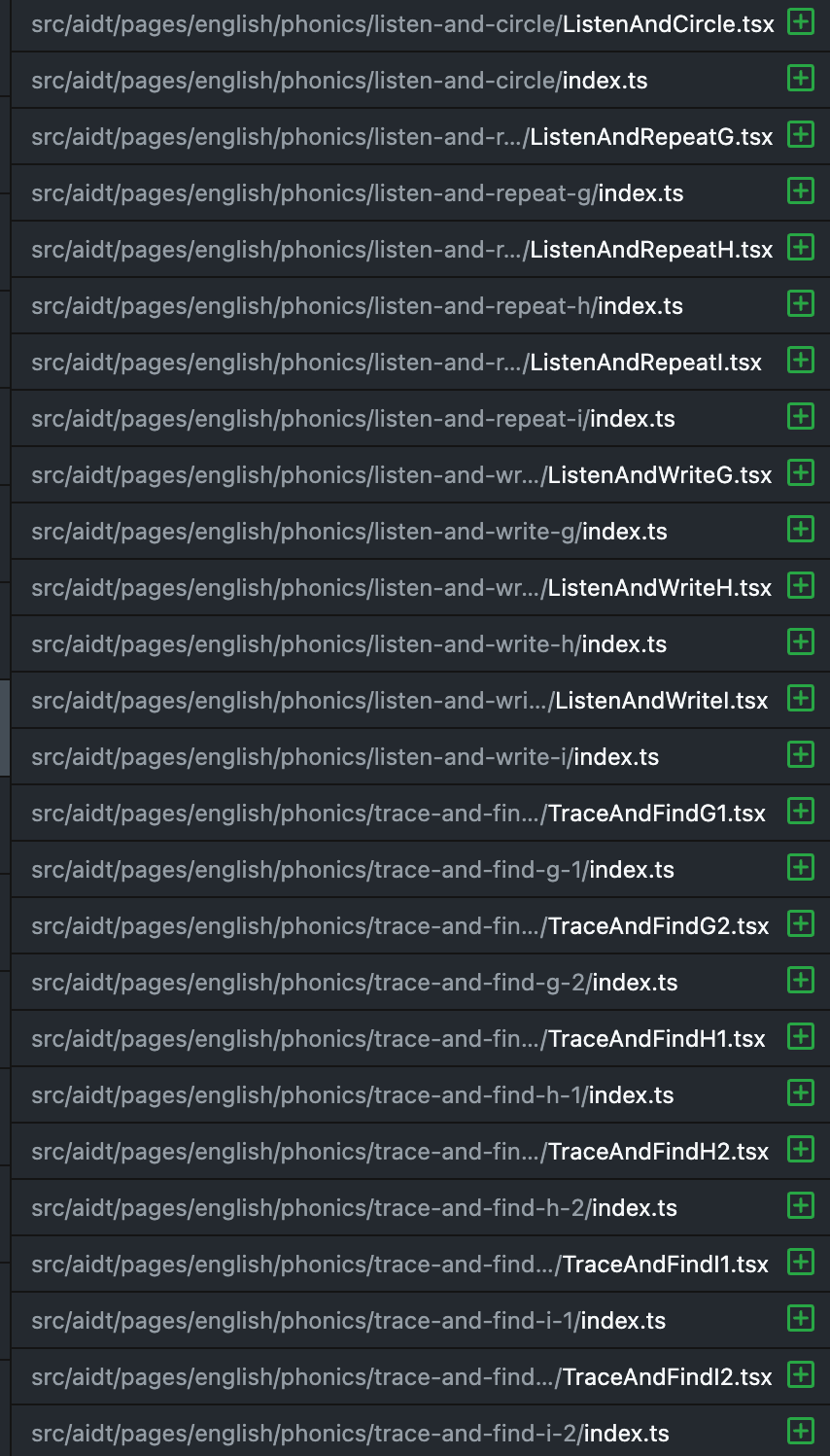
생성이 잘 되었다
👍