1. Axios
: Node.js와 브라우저를 위한 Promise 기반 HTTP 클라이언트
💡 Promise 기반?
Promise는 프로미스가 생성된 시점에는 알려지지 않았을 수도 있는 값을 위한 대리자이다. JS에서 비동기 처리에 사용되는 객체로 Callback지옥의 단점을 해결하기 위해 등장하였다. 프로미스를 사용하면 비동기 메서드에서 마치 동기 메서드처럼 값을 반환할 수 있다. 다만 최종 결과가 아니라 미래의 어떤 시점에 결과를 제공하겠다는 프로미스(Promise)를 반환한다. Promise는 pending, fulfilled, rejected 중 하나의 상태를 가진다.
여기서 Promise 기반이라는말은, 비동기 작업을 처리하기 위해 Promise를 사용한다는 것을 의미하며 axios를 사용하여 데이터를 호출하면 Promise를 리턴한다는 것이다.
추가 정보 : 2. Promise
-
동형이다. 즉, 동일한 코드베이스로 브라우저와 node.js에서 실행할 수 있다.
-
서버(Node.js)에서는 http모듈을 사용하고, 클라이언트(브라우저)에서는 XMLHttpRequest를 사용한다.
💡 http?
: Node.js 내장 모듈로, 클라이언트 및 서버를 생성하는 기능을 제공한다.
- HTTP 통신을 위한 저수준 API를 제공하며, HTTP 요청을 보내고 응답을 받을 수 있다.
추가 정보 : 2. axios는 내부적으로 http/XMLHttpRequest을 어떻게 처리했을까?
: = XHR, 서버와통신을 하도록 하는 객체
-
서버와 상호작용할 때 사용한다.
-
AJAX프로그래밍에 많이 사용된다. 페이지의 새로고침 없이도 URL에서 데이터를 가져올 수 있다.
💡 AJAX?
; Asynchronous Javascript And XML, 비동기식 자바스크립트와 XML
- 브라우저가 가진 XMLHttpRequest객체를 이용한 전체 페이지를 새로 고치지 않고도 페이지의 일부만을 위한 데이터를 로드하는 기법
- 비동기식으로 실행하기에 화면이 순간적으로 깜빡이는 현상이 없다.
❓ Javascript는 싱글 스레드 언어이고 기본적으로 동기적으로 실행되는 걸로 아는데, XMLHttpRequest는 어떻게 비동기로 실행하는 걸까?
자바스크립트는 단독으로 실행되지 않는다. V8이라는 Javascript 엔진은 Node.js 환경에서는 Node.js에 탑재되어, 브라우저에서는 브라우저에 탑재되어 실행된다. Node.js환경에서는 Node.js API, 브라우저에서는 Web API를 활용할 수 있다. 이 때, 비동기 함수를 JS가 실행하게 되면 해당 환경에 위임하여 작업을 처리한다. 작업이 완료되면 Task Queue에 추가된다. 그리고, Event Loop는 Call Stack이 비었는 지 체크하여, 만약 비었다면 Callback 함수를 Call Stack에 넣어 처리하게 된다.
추가 내용 : Javascript에서 비동기 처리 방법 (Callback Queue, Event Loop, Promise, async-await, Libuv)
-
Promise API를 지원한다.
Axios의 기능
- 요청 및 응답 인터셉트 : axios.interceptor
- 요청 및 응답 데이터 변환 : axios.interceptor
- 요청 취소 : axios.cancelToken
- JSON 데이터 자동 변환 : fetch처럼 응답 시 .json(), 요청 시 .stringify()을 하지 않아도 된다.
- CSRF(= XSRF)를 막기 위한 클라이언트 사이드 지원
각 기능들
get요청
axios.get('/user?ID=12345')
  .then(function (response) {
    // 성공 핸들링
    console.log(response);
  })
  .catch(function (error) {
    // 에러 핸들링
    console.log(error);
  })
  .finally(function () {
    // 항상 실행되는 영역
  });
post요청
axios.post('/user', {
    firstName: 'Fred',
    lastName: 'Flintstone'
  })
  .then(function (response) {
    console.log(response);
  })
  .catch(function (error) {
    console.log(error);
  });
config 설정
axios.defaults.baseURL = 'https://api.example.com';
axios.defaults.headers.common['Authorization'] = AUTH_TOKEN;
axios.defaults.headers.post['Content-Type'] = 'application/x-www-form-urlencoded';
인스턴스
: 사용자 정의 config로 새로운 axios 인스턴스를 만들 수 있다.
const instance = axios.create({
  baseURL: 'https://some-domain.com/api/',
  timeout: 1000,
  headers: {'X-Custom-Header': 'foobar'}
});인터셉터
: then 또는 catch로 처리되기 전에 요청과 응답을 가로챌 수 있다.
// 요청 인터셉터 추가하기
axios.interceptors.request.use(function (config) {
    // 요청이 전달되기 전에 작업 수행
    return config;
  }, function (error) {
    // 요청 오류가 있는 작업 수행
    return Promise.reject(error);
  });

// 응답 인터셉터 추가하기
axios.interceptors.response.use(function (response) {
    // 2xx 범위에 있는 상태 코드는 이 함수를 트리거 합니다.
    // 응답 데이터가 있는 작업 수행
    return response;
  }, function (error) {
    // 2xx 외의 범위에 있는 상태 코드는 이 함수를 트리거 합니다.
    // 응답 오류가 있는 작업 수행
    return Promise.reject(error);
  });
2. Fetch
: 콜백 기반 API인 XMLHttpRequest와 달리 서비스 워커에서도 쉽게 사용할 수 있는 Promise 기반의 개선된 대체제이다.
-
XMLHttpRequest는 기본적으로 콜백 기반이지만, 이를 래핑한 Axios는 Promise기반으로 변환해준 것이다.
💡 XMLHttpRequest?
: 웹 응용 프로그램, 브라우저, 그리고 네트워크 사이의 프록시 서버 역할을 한다.
- 워커 맥락에서 실행되기에 DOM에 접근할 수 없다.
- 주 JS와 다른 스레드에서 동작하므로 연산을 가로막지 않는다.
- 비동기적으로 설계 되었으며, 동기적 XHR이나 웹 저장소 등의 API를 Service Worker내에서 사용할 수 있다.
-
모던 브라우저에 내장되어 있어 설치가 따로 필요 없다.
사용 예시
let response = await fetch(url);

if (response.ok) {
  let json = await response.json();
} else {
  alert("HTTP-Error: " + response.status);
}- reponse에는 Promise를 기반으로 하는 다양한 메서드가 있다 : text(), json(), formData(), blob()..
ky
: fetch기반 라이브러리로, axios처럼 간편하게 사용할 수 있도록 fetch를 래핑한 라이브러리
각 기능들
- 간단한 API
- 메서드 단축 e.g.
ky.post() - timeout 지원
- URL prefix 옵션
- 기본값 설정 인스턴스 생성
사용법
import ky from 'ky';

const json = await ky.post('https://example.com', {json: {foo: true}}).json();

console.log(json);
//=> `{data: '🦄'}`
3. Axios vs Fetch
1. JSON 데이터 처리 (GET)
-
axios는 Axios.get()메서드를 시용하여 간단하게 GET 요청을 보낼 수 있다. 그리고 response.data로 접근할 수 있다.
const data = await axios.get(url, { // 설정 옵션 }); -
fetch는 Promise형태로 온 응답 데이터를
.json()등 메서드를 이용하여 파싱해야 한다. 그 다음 데이터에 접근할 수 있다.const response = await fetch(url); if (response.ok) { let data = await response.json(); // 데이터 처리 } else { alert("HTTP-Error: " + response.status); }
2. 자동 문자열 변환 (POST)
-
axios :
.post()메서드를 사용할 때 자동으로 데이터를 문자열로 변환해준다.axios .post(url, { headers: { "Content-Type": "application/json", }, data: todo, }) .then(console.log); -
fetch : 직접
.stringify()를 사용하여 문자열을 직렬화해주어야 한다.fetch(url, { method: "post", headers: { "Content-Type": "application/json", }, body: JSON.stringify(todo), })
3. 에러 처리
axios와 fetch 모두 Promise객체를 반환하기 때문에 reject시 .catch()를 이용하여 에러를 처리할 수 있다.
-
axios : Promise 상태코드가 2xx의 범위를 넘어가면 reject한다.
axios .get(url) .then(response => // ..) .catch(err => console.log(err.response)) -
fetch : HTTP 에러 응답을 받았다고 reject하지 않는다. 네트워크 장애가 발생한 경우에만 reject한다.
.``then절에서 직접 에러를 처리해야 한다.fetch(url) .then(response => { if(!response.ok){ // 에러 핸들링 } return response.json(); }) .then(data => console.log(data))
4. 응답 시간 초과 / 요청 취소
-
axios : timeout옵션을 설정하여 응답 시간 초과 시 에러를 띄울 수 있다.
axios .get(url,{timeout : 4000}) -
fetch :
AbortController인터페이스를 사용할 수 있다.const controller = new AbortController(); const signal = controller.signal; setTimeout(() => controller.abort(),4000); fetch(url,{ signal:signal }): 하나 이상의 웹 요청을 취소할 수 있게 해주는 인터페이스
AbortController.signal: DOM요청과 통신하거나 취소하는데 사용되는 AbortSignal객체 인터페이스를 반환한다.AbortController.abort(): DOM요청이 완료되기 전에 취소한다. 이를 통해 fetch 요청, 모든 body 소비, 스트림을 취소할 수 있다.
5. 성능
fetch와 axios 모두 Promise기반이기에 성능 문제를 일으키지 않는다.
MeasureThat.net 사이트에서 비교해볼 수 있다.
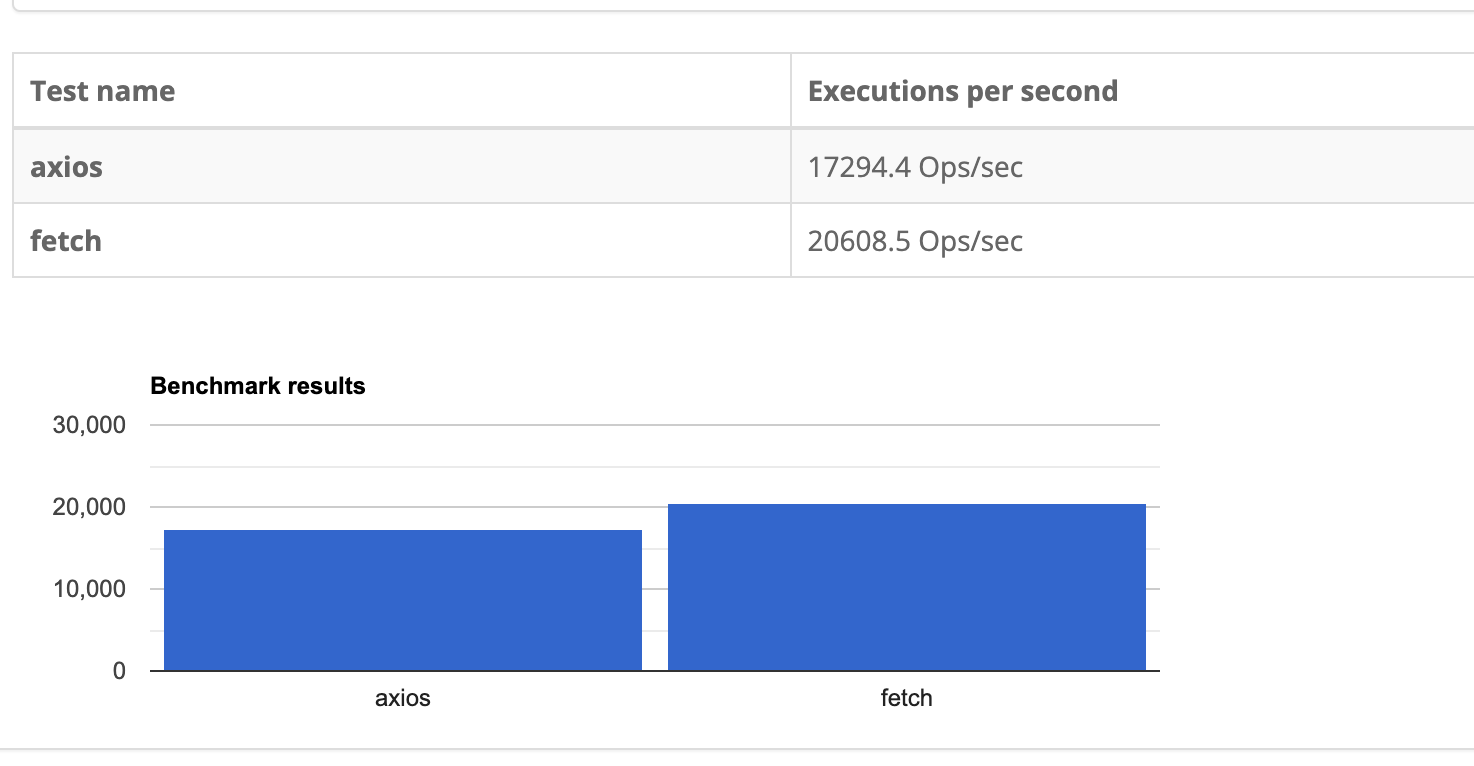
6. 호환성
- axios : XMLHttpRequest객체 기반이기 때문에 브라우저가 구버전이든 신버전으든 상관없이 사용 가능하다.
- fetch : 지원하지 않는 브라우저의 버전이 존재하며, 호환을 위해서는 polyfill을 사용해야 한다.
7. progress
-
axios : onUploadProgress옵션을 이용하여 업로드 진행 이벤트 작업을 수행할 수 있다.
-
이는 XmlHttpRequest에서 제공하는 onProgress 메서드를 확장한다.
if (typeof _config.onUploadProgress === 'function' && request.upload) {
  request.upload.addEventListener('progress', progressEventReducer(_config.onUploadProgress));
}
-
-
fetch : onProgress handler를 제공하지 않으며, 대신 ReadableStream을 제공한다.
: 바이트 데이터를 읽을 수 있는 스트림을 제공한다.
정리
정리하자면, fetch는 콜백 기반인 XMLHttpRequest(XHR)과 달리 Promise 기반이기때문에 서비스 워커 등 다양한 곳에서 쉽게 활용할 수 있다. 하지만, fetch는 GET 요청 후 .json() 등의 메서드를 이용하여 파싱한 후 사용해야한 다는 점, POST요청할 때 문자열을 직접 stringify을 이용하여 직렬화를해야한다는 점, 에러처리할 때 네트워크가 아니라면 reject하지 않는다는 점, interceptor기능을 제공하지 않는다는 점 등 Axios에 비해서 불편한 점들이 많다.
다만 브라우저 내장 API로 추가 설치가 필요 없다는 점, 가볍고 단순한 인터페이스라는 점, 모던 JS와 잘 통합된다는 장점 또한 존재한다.
또한, Axios를 사용하면 Node.js환경에서는 http모듈을, 브라우저 환경에서는 XHR객체를 이용하여 데이터를 패칭하기에 두 환경에서 객체를 공유하지 않는다. 그래서 Next.js에서 SSR을 구현할 때 이러한 점을 유의해야 한다. Next.js에서 서버는 Node.js, 클라이언트는 브라우저이기 때문이다.
4. 궁금증
1. Axios는 어떻게 Axios 인스턴스를 생성할 수 있게 했을까?
가장 먼저, Axios 구현체를 살펴보자
1) axios/lib/axios
function createInstance(defaultConfig) {
  const context = new Axios(defaultConfig);
  const instance = bind(Axios.prototype.request, context);

  // Copy axios.prototype to instance
  utils.extend(instance, Axios.prototype, context, {allOwnKeys: true});

  // Copy context to instance
  utils.extend(instance, context, null, {allOwnKeys: true});

  // Factory for creating new instances
  instance.create = function create(instanceConfig) {
    return createInstance(mergeConfig(defaultConfig, instanceConfig));
  };

  return instance;
}

// Create the default instance to be exported
const axios = createInstance(defaults);
axios.Axios = Axios;

axios.spread = spread;

// Expose isAxiosError
axios.isAxiosError = isAxiosError;

// ..

axios.getAdapter = adapters.getAdapter;

// ..

export default axios-
인자로 전달받은 config를 Axios클래스에 넘겨 context를 만든다. 그리고 Axios.prototype.request를 context에 bind하여 instance를 생성한다. 이 instance는 나중에 리턴할 객체이다.
// axios/lib/axios function createInstance(defaultConfig) { const context = new Axios(defaultConfig); const instance = bind(Axios.prototype.request, context); // .. return instance; }-
bind는 뒤에 오는 인자가 앞의 인자를 가리키도록 하는 헬퍼 함수이다.
// axios/lib/helpers/bind.js
export default function bind(fn, thisArg) {
  return function wrap() {
    return fn.apply(thisArg, arguments);
  };
}
특정 객체에 함수를 바인딩하는 헬퍼 함수이다. 이를 통해, this가 항상 지정된 객체를 가리키도록 할 수 있다. Function.prototype.bind메서드와 유사한 기능을 제공하지만 더 간단하고 가벼운 버전이다.
새로운 함수를 만드는 메서드이다.
const module = {
  x: 42,
  getX: function () {
    return this.x;
  },
};

const unboundGetX = module.getX;
console.log(unboundGetX());

const boundGetX = unboundGetX.bind(module);
console.log(boundGetX());
this는 동적으로 결정되며, 함수를 어디서 정의했느냐가 아니라 호출했느냐에 따라 결정된다. 처음 unboundGetX = module.getX에서, 함수만 복사되고 module과의 연결은 끊긴다. 그렇기에 unboundGetX함수 내부의 this는 전역을 가리키게 된다.
하지만, bind를 통해 unboundGetX를 module 객체에 바인딩할 경우, this가 module을 가리키게 된다.
자세한 내용 : Javascript this
-
-
axios.prototype을 instance에 복사한다.
utils.extend(instance, Axios.prototype, context, {allOwnKeys: true}); -
context를 instance에 복사한다.
utils.extend(instance, context, null, {allOwnKeys: true}); -
새로운 인스턴스를 만드는 메서드를 instance에 추가한다.
instance.create = function create(instanceConfig) {
  return createInstance(mergeConfig(defaultConfig, instanceConfig));
};
이 덕분에 Axios Instance를 우리도 생성할 수 있는 것이다.
-
위 과정을 통해 생성한 instance를 리턴한다.
return instance;
정리하면, createInstance는 주어진 설정을 바탕으로 Axios객체를 설정하는 과정이다. 내가 알고 싶은 것은 “Axios내부적으로 http/XMLHttpRequest를 어떻게 처리했을까”이다.
중간에 getAdapter라는 것이 보인다.
어댑터, 즉 무언가 변환해주는 것이다. 이 함수에 들어가볼까?
2. axios는 내부적으로 http/XMLHttpRequest을 어떻게 처리했을까?
1) axios/lib/adaptors/adapters.js
import httpAdapter from './http.js';
import xhrAdapter from './xhr.js';
import fetchAdapter from './fetch.js';

// ..

const knownAdapters = {
  http: httpAdapter,
  xhr: xhrAdapter,
  fetch: fetchAdapter
}

// ..

export default {
	getAdapter: (adapters) => {
		// ..
	      if (!isResolvedHandle(nameOrAdapter)) {
      adapter = knownAdapters[(id = String(nameOrAdapter)).toLowerCase()];

      if (adapter === undefined) {
        throw new AxiosError(`Unknown adapter '${id}'`);
      }
    }
    // ..
	}
}
2) axios/lib/adapters/http.js
const isHttpAdapterSupported = typeof process !== 'undefined' && utils.kindOf(process) === 'process';

export default isHttpAdapterSupported && function httpAdapter(config) {
  return wrapAsync(async function dispatchHttpRequest(resolve, reject, onDone) {
	  // ..
    let transport;
    const isHttpsRequest = isHttps.test(options.protocol);
    options.agent = isHttpsRequest ? config.httpsAgent : config.httpAgent;
    if (config.transport) {
      transport = config.transport;
    } else if (config.maxRedirects === 0) {
      transport = isHttpsRequest ? https : http;
    } else {
      if (config.maxRedirects) {
        options.maxRedirects = config.maxRedirects;
      }
      if (config.beforeRedirect) {
        options.beforeRedirects.config = config.beforeRedirect;
      }
      transport = isHttpsRequest ? httpsFollow : httpFollow;
    }
    // ..
      req = transport.request(options, function handleResponse(res) {
      if (req.destroyed) return;

      const streams = [res];

      const responseLength = +res.headers['content-length'];

      if (onDownloadProgress) {
        const transformStream = new AxiosTransformStream({
          length: utils.toFiniteNumber(responseLength),
          maxRate: utils.toFiniteNumber(maxDownloadRate)
        });

        onDownloadProgress && transformStream.on('progress', progress => {
          onDownloadProgress(Object.assign(progress, {
            download: true
          }));
        });

        streams.push(transformStream);
}-
isHttpAdapterSupported를 통해 http를 지원하는 환경인 지 체크한다.
const isHttpAdapterSupported = typeof process !== 'undefined' && utils.kindOf(process) === 'process';Node.js 환경인지 체크하는 함수이다. process객체는 Node.js환경에서 글로벌로 사용 가능한 객체이다.
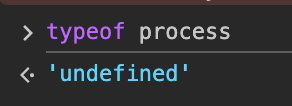
브라우저 환경(콘솔) 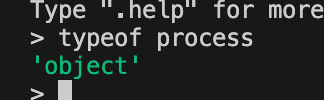
Node.js 환경(node) 위와 같이, Node.js환경에서 typeof process를 실행했을 때 객체를 반환한다. typeof window 외에도 이런 방식이 있다는 걸 알게되었다.
-
그리고 transport를 생성한다. transport에는 isHttpsRequest냐에 따라 https 혹은 http를 할당한다. 이 isHttpsRequest는 정규표현식으로 https프로토콜인지 체크한다.
const isHttps = /https:?/; // .. const isHttpsRequest = isHttps.test(options.protocol); -
그리고 transport.request를 이용하여 데이터를 요청한다. 즉, http프로토콜에서는 http.request를, https프토로콜에는 https.request를 사용함을 알 수 있다.
💡 http.request, https.request?
http.request는 HTTP 요청을 생성하는 데 사용한다.
http.request(options[, callback])이 메서드는 http.ClientRequest객체를 반환한다.
https도 프로토콜만 다를 뿐 위와 동일하다.
정리하자면, http 어댑터에서는, http를 사용 가능한 환경인 지 체크하여, 사용 가능한 환경이라면 http프로토콜인 지 https 프로토콜인 지 체크한 후 http.request / https.request로 함수를 호출하는 것이다.
또한, Promise객체로 이를 반환하기 위하여 wrapAsync로 감쌌다.
❓ http.request와 https.request는 Promise객체를 반환하지 않나?
http.request와 https.request는 Node.js의 전통적인 콜백 기반의 API를 사용한다. 그렇기에 Promise기반 인터페이스로 변환함으로써 에러를 reject, 성공을 resolve로 처리할 수 있게 된다.
3) axios/lib/adapters/xhr.js
const isXHRAdapterSupported = typeof XMLHttpRequest !== 'undefined';
export default isXHRAdapterSupported && function (config) {
  return new Promise(function dispatchXhrRequest(resolve, reject) {
	  // ..
		let request = new XMLHttpRequest();
		request.open(_config.method.toUpperCase(), _config.url, true);
		request.timeout = _config.timeout;
		// ..
		if('onloadend' in request){
			request.onloaded = onloaded;
		}
		// ..
		request.onabort = function handleAbort(){
			// ..
		}
		request.onerror = function handleError(){
				// ..
		}
		request.ontimeout = function handleTimeout(){
				// ..
		}
	});
}-
만약 isXHRAdapterSupported, 즉 XHRAdapter를 지원하는 브라우저 환경이라면 해당 함수를 실행한다.
const isXHRAdapterSupported = typeof XMLHttpRequest !== 'undefined';XMLHttpRequest이 존재하는 곳은 브라우저 환경이다.
-
해당 함수는 dispatchXHRReuest함수를 래핑한 Promise객체를 리턴한다. 그리고 XMLHttpRequest객체를 생성하고, 이 객체의 open, timeout, onloaded, onabort등 메서드에 이벤트 핸들러를 추가한다.
4) axios/lib/adapters/fetch.js
const isFetchSupported = typeof fetch === 'function' && typeof Request === 'function' && typeof Response === 'function';
export default isFetchSupported && (async (config) => {
	// ..
   request = new Request(url, {
    ...fetchOptions,
    signal: composedSignal,
    method: method.toUpperCase(),
    headers: headers.normalize().toJSON(),
    body: data,
    duplex: "half",
    withCredentials
  });

  let response = await fetch(request);

  // ..

  return await new Promise((resolve, reject) => {
    settle(resolve, reject, {
      data: responseData,
      headers: AxiosHeaders.from(response.headers),
      status: response.status,
      statusText: response.statusText,
      config,
      request
    })
  })
  // ..
});-
가장 먼저 fetch를 사용 가능한 환경인 지 체크한다.
const isFetchSupported = typeof fetch === 'function' && typeof Request === 'function' && typeof Response === 'function';fetch 함수가 존재하고, Request와 Response 또한 존재하는 지 확인한다.
-
주어진 request를 fetch에 맞게 변형을 하여, fetch를 실행하여 데이터를 패칭해 오는 것을 확인할 수 있다. 그리고, fetch로부터 전달받은 response를 Axios에 맞게 변형하여 Promise객체로 리턴한다.
정리
정리하자면, Axios는 브라우저에서는 XMLHttpRequest객체를 사용하고 Node.js 환경에서는 Node.js의 http모듈을 사용한다. 이러한 각 변환해주는 것을 adapter폴더 내부 각 파일들에서 수행하고 있으며, Promise로 감싸서 반환하는 것을 확인할 수 있다.
추가 공부
1. Axios 특징 - CSRF(= XSRF)를 막기 위한 클라이언트 사이드 지원 ?❓ fetch 어댑터가 있네?
브라우저 환경에서는 XMLHttpRequest객체, Node.js환경에서는 Node.js의 http 모듈을 사용하는 것으로 알고 있다. 근데 fetch 어댑터가 왜 있는거지?
Reference
https://sdy-study.tistory.com/38