1. Github Actions란?
: GitHub 내 어떤 이벤트(push, pull, merge ...)가 발생하면 해당 이벤트에 대해 정해진 동작을 자동으로 실행하게 하는 도구
GitHub Actions를 사용하여 리포지토리에서 바로 소프트웨어 개발 워크플로를 자동화, 사용자 지정 및 실행합니다. CI/CD를 포함하여 원하는 작업을 수행하기 위한 작업을 검색, 생성 및 공유하고 완전히 사용자 정의된 워크플로에서 작업을 결합할 수 있습니다.
자세한 내용은 Github Actions(Legacy) 에 정리하였습니다.
2. Label 자동화
# .github/workflows/auto-label.yml
name: Auto Label
on:
  pull_request:
    types: [opened, reopened, edited]
  issues:
    types: [opened, reopened, edited]

jobs:
  labeler:
    runs-on: ubuntu-latest
    permissions:
      contents: read
      pull-requests: write
    steps:
      - name: Check Labels
        id: labeler
        uses: jimschubert/labeler-action@v1
        with:
GITHUB_TOKEN: ${{secrets.GITHUB_TOKEN}}jimschubert/labeler-action@v1는 텍스트 기반의 룰을 사용하여 GitHub Issues와 PR에 자동으로 레이블을 추가합니다. 예를 들어, PR 또는 Issue의 제목이나 설명에 특정 키워드가 포함되어 있으면, 해당 키워드와 일치하는 레이블이 자동으로 부착됩니다.
- Trigger 조건: 이 Action은 PR 또는 Issue가 열리거나 닫혔다가 다시 열렸을 때, 또는 수정되었을 때 실행됩니다.
- Token 전달: GitHub Action에는 **
GITHUB_TOKEN**이 전달되어야 합니다. 이 토큰은 GitHub이 자동으로 생성하여 Action에 제공합니다. - 필요한 추가 파일:
.github/labeler.yml파일이 필요합니다. 이 파일에서는 레이블링을 위한 규칙을 정의합니다.
.github/labeler.yml 설정 예시
# .github/labeler.yml
enable:
  issues: true
  prs: true

comments:
  prs: |
    Labeler가 제목과 설명에 있는 특별한 텍스트와 일치하는 레이블을 적용했습니다.
    Label을 검토하고 필요한 변경 사항을 적용해 주세요.

labels:
  'Component':
    include:
      - '\bComponent\b'
  'Fix':
    include:
      - '\bFix\b'
# 추가 레이블 설정
전체 코드
# enable labeler on issues, prs, or both.
enable:
  issues: true
  prs: true

comments:
  prs: |
    Labeler가 제목과 설명에 있는 특별한 텍스트와 일치하는 레이블을 적용했습니다.
    Label을 검토하고 필요한 변경 사항을 적용해 주세요.

labels:
  'Component':
    include:
      - '\bComponent\b'
  'Fix':
    include:
      - '\bFix\b'
  'Bug':
    include:
      - '\bBug\b'
  'Page':
    include:
      - '\bPage\b'
  'Docs':
    include:
      - '\bDocs\b'
  'Setting':
    include:
      - '\bSetting\b'
  'Refactoring':
    include:
      - '\bRefactoring\b'
  'Help wanted':
    include:
      - '\binclude\b'
  'Test':
    include:
      - '\bTest\b'
  'Featuring':
    include:
      - '\bFeaturing\b'
이 파일에서는 레이블을 적용할 조건들을 정의합니다. 예를 들어, 제목이나 설명에 'Component'라는 단어가 포함되어 있으면, 자동으로 'Component' 레이블이 부착됩니다.
2. MileStone 자동 할당
MileStone은 프로젝트 진행 시 일정 관리 및 목표 설정을 효율적으로 돕는데 큰 역할을 합니다. 이 MileStone을 자동 할당하는 방법에 대해 알아보겠습니다.
# .github/workflows/auto-milestone.yml
name: 'Auto Milestone Assign'

on:
  pull_request:
    types: [opened, reopened, edited]
  issues:
    types: [opened, reopened, edited]

jobs:
  assign-milestone:
    runs-on: ubuntu-latest

    steps:
      - uses: zoispag/action-assign-milestone@v1
        with:
          repo-token: '${{ secrets.GITHUB_TOKEN }}'
          milestone: '7월 2주차 Sprint'
GitHub Action : Milestone 자동부여
zoispag/action-assign-milestone은 PR 또는 Issue에 Milestone을 자동으로 할당합니다.
주요 구성 요소
- Trigger 조건 : Pull Request(PR) 또는 Issue가 생성, 재오픈, 수정될 때 이 Action이 실행됩니다.
- Token 전달: GitHub에서 제공하는 **
GITHUB_TOKEN**을 Action에 전달합니다. 이 토큰은 GitHub에서 자동으로 생성되며, 다양한 권한을 부여받은 상태입니다. - Milestone 설정: **
milestone**이라는 필드에 **7월 2주차 Sprint**라는 값을 설정하여, 해당 이름의 Milestone이 자동으로 할당됩니다.
3. eslint와 prettier 자동화
# .github/workflows/check-eslint-prettier.yml
name: Check and Fix Code Style
on:
  pull_request:
    branches:
      - develop
    types: [opened, synchronize, reopened, edited]

jobs:
  format-and-lint:
    name: Format and Lint Source Code
    runs-on: ubuntu-latest
    steps:
      - name: Check out the repository
        uses: actions/checkout@v2

      - name: Set up Node.js
        uses: actions/setup-node@v2
        with:
          node-version: '14'

      - name: Install dependencies
        run: yarn install

      - name: Run Prettier
        run: yarn format

      - name: Run ESLint
        run: yarn lint

      - name: Commit and Push changes
        run: |
          git config --global user.name 'Your Name'
          git config --global user.email 'your-email@example.com'
          git add -A
          git commit -m "Apply Prettier formatting" -a || echo "No changes to commit"
git pushactions/checkout은 저장소의 코드를 체크아웃하여 작업을 시작할 수 있도록 해줍니다.
actions/setup-node는 Github Actions에서 Node.js 환경을 설정하고 관리할 수 있게 해주는 Github Action입니다.
- Trigger 조건 :
develop브랜치에 대한 Pull Request가 열리거나, 동기화, 재개, 수정될 때마다 이 Workflow가 실행됩니다. - 실행 단계
- 패키지 설치:
yarn install명령어를 통해 필요한 패키지들을 설치합니다.
- 패키지 설치:
- Prettier 적용: **
.gitignore**에 명시된 파일을 제외하고, 모든 파일에prettier포매팅을 적용합니다.- 이 때, prettier는
- Lint 실행: **
eslint**를 실행하여 코드의 문법적 오류나 스타일 문제를 검사합니다.
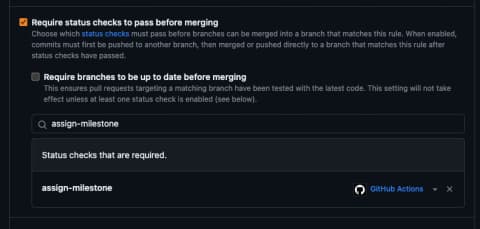
- Branch Rules 설정: GitHub의 **
Branch Rules**을 통해 이 Workflow에서 에러가 발생하면 Merge가 불가능하도록 설정할 수 있습니다.
추가로, Github Action에러 시 머지가 되지 않도록 Github > Branch Rules에서 아래 설정을 해야합니다.