1. 스팩 정의
기능 스팩
- TTS 함수를 리턴해서, 해당 함수를 사용하면, 음성으로 실행이 된다.
- 해당 함수를 사용한 컴포넌트가 언마운트되면, 음성은 멈춘다.
개발 스팩
-
컴포넌트가 언마운트 되었을 때 = useEffect 내 return 정리 함수이므로, useEffect훅을 사용해야 한다. 이는 커스텀 훅에서만 사용할 수 있다.
-
startSpeech, pauseSpeech함수를 리턴한다.
-
window.speechSynthesis를 사용한다.
: SpeechSynthesis 객체를 리턴하는 window 객체
- Web Speech API를 사용할 수 있게 해주는 객체이다.
2. 개발
1. ref로 객체를 관리한다.
const synthRef = React.useRef<SpeechSynthesis>(window.speechSynthesis);
const utteranceRef = React.useRef<SpeechSynthesisUtterance | null>(null);
utterranceRef도 synthRef처럼, useRef 인자에 값을 넘겨서 생성할 수 있다. 이러한 경우 props로 오디오 재생에 필요한 데이터를 넘겨주면 된다. 하지만, 우리는 startSpeech함수를 실행할 때 content같은 데이터를 보내줄 것이기에, 여기서는 null로 선언한다.
💡 SpeechSynthesis, SpeechSynthesisUtterance 객체
SpeechSynthesis는 위에서 설명한, Web Speech API를 사용할 수 있게 해주는 객체이다. 이 객체를 이용해서 오디오를 실행, 중단 등 오디오에 대한 제어를 할 것이다.
SpeechSynthesisUtterance객체는 언어, 속도, 내용, 목소리, 볼륨 등 스피치 요청에 대한 정보를 담은 객체이다.
2. 스피치를 시작, 중단, 재실행하는 함수를 만든다.
-
startSpeech
const startSpeech = (text: string) => {
  utteranceRef.current = new SpeechSynthesisUtterance(text);
  synthRef.current.speak(utteranceRef.current);
};
text를 인자로 전달받아, 스피치 요청에 대한 정보를 담는 SpeechSynthesisUtterance객체를 만든다. 이 SpeechSynthesisUtterance객체를 SpeechSynthesis.speak() 메서드에 전달한다.
-
pauseSpeech
const pauseSpeech = () => { synthRef.current.pause(); }; -
resumeSpeech
const resumeSpeech = () => {
  if (synthRef.current.paused) {
    synthRef.current.resume();
  }
};
트러블 슈팅
1. startSpeech를 클릭해도, 실행이 안된다.
- 여러 번 startSpeech를 누른 탓이었다. 스택으로 쌓여서, 실행이 안되었나보다.
- 해결 방법 : startSpeech를 누르면, 이전 스피치가 취소되도록 하자.
const startSpeech = (text: string) => {
  utteranceRef.current = new SpeechSynthesisUtterance(text);

  if (synthRef.current.speaking) {
    synthRef.current.cancel();
  }

  synthRef.current.speak(utteranceRef.current);
};
2. useEffect의 cleanup함수가 동작하지 않는다.
React.useEffect(() => {
  console.log(1);
  return () => {
    console.log(2);
  };
}, []);
이렇게 실행해 디버깅을 해보았을 때, 1만 찍힌다.
비정상적으로 컴포넌트가 언마운트 되어서? 지금, iframe 안에 document를 가져와 띄우는 방식이다.
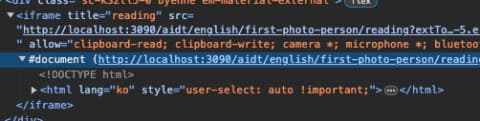
이 iframe 안의 페이지 자체가 바뀌면서 클린업 함수가 실행되지 않는 듯하다.
useEffect의 클린업 함수가 발생하는 조건은 다음과 같다
- 컴포넌트가 언마운트 될 때
- 의존성 배열이 변경될 때
하지만 iframe안에서 페이지가 바뀌는 경우, 리액트 컴포넌트 자체가 언마운트 되지 않기 때문에 useEffect의 클린업 함수는 실행되지 않는다. iframe내부의 페이지 변경은 브라우저의 기본적인 페이지 이동으로 간주되기 때문이다.
-
그렇다면 해결책은?
💡 window.unload, window.beforeunload, window.pagehide
- window.unload(duplicated) : 사용자가 페이지를 떠날 때 발생
- window.beforeunload : 사용자가 페이지를 떠날 때 발생
- window.pagehide : 브라우저가 현재 페이지를 숨겼을 때 창으로 전송된다.
React.useEffect(() => {
  window.addEventListener('beforeunload', pauseSpeech);
}, []);
beforeunload에 이벤트 함수를 추가한다.