1. 문제
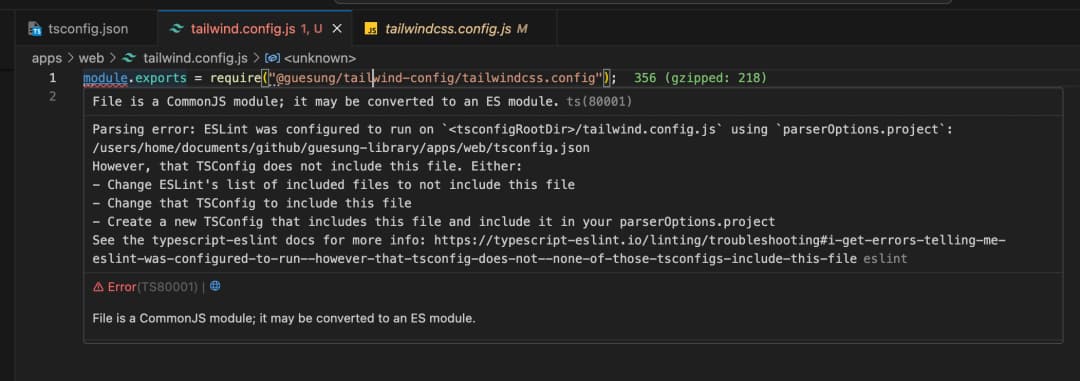
tailwind.config.js에서는 위와같은 에러가 뜬다. 모듈 경로 위치의 문제는 아니다.
2. 해결 과정
-
tailwindcss가 설치가 잘 안된 건 아닐까?
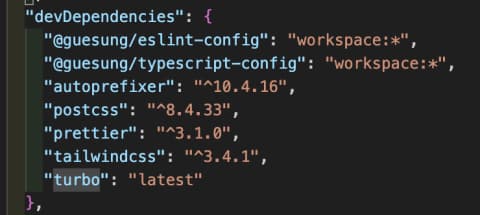
tailwindcss, postcss, autoprefixer 모두 설치되어있다.
-
tailwind설정이 잘못된건 아닐가?
// postcss.config.js
module.exports = require("@guesung/tailwind-config/postcss.config");
// packages/configs/tailwind/postcss.config.js
module.exports = {
  plugins: {
    tailwindcss: {},
    autoprefixer: {},
  },
};
// tailwind.config.js module.exports = require("@guesung/tailwind-config/tailwindcss.config"); // packages/configs/tailwind/tailwindcss.config.js module.exports = { content: [ "../../packages/ui/**/*.{js,ts,jsx,tsx}", "../../../apps/web/src/**/*.{js,ts,jsx,tsx}", "./**/*.{js,ts,jsx,tsx}", "./pages/**/*.{js,ts,jsx,tsx}", "./app/**/*.{js,ts,jsx,tsx}", ], theme: { extend: {}, }, };경로 문제 없고, 설정 잘 되어있다.
// global.css
@tailwind base;
@tailwind components;
@tailwind utilities;
tailwind설정에 필요한 설정도 되어 있다.
-
다른 분들은 같은 이슈를 겪지 않았을까?
-
tailwindcss를 각 패키지에 설치해볼까?
-
next.js + tailwindcss를 create-next-app으로 설치해볼까?
- 정상적으로 동작한다.
import type { Config } from 'tailwindcss'

const config: Config = {
  content: [
    './src/pages/**/*.{js,ts,jsx,tsx,mdx}',
    './src/components/**/*.{js,ts,jsx,tsx,mdx}',
    './src/app/**/*.{js,ts,jsx,tsx,mdx}',
  ],
  theme: {
    extend: {
      backgroundImage: {
        'gradient-radial': 'radial-gradient(var(--tw-gradient-stops))',
        'gradient-conic':
          'conic-gradient(from 180deg at 50% 50%, var(--tw-gradient-stops))',
      },
    },
  },
  plugins: [],
}
export default config
기존 modules.exporrs방식이 아닌 import/export 방식으로 구현을 했다. CommonJS방식이 아닌 ES Module 방식을 사용한 것이다.
- 새로 만든 Next.js의 package.json에서 tailwindcss를 제거햇는데 정상적으로 실행이 된다. 루트 package.json에서 tailwindcss모듈을 명시해줬기 떄문이다.
기존의 Next.js에서 tailwind.config.js를 위 코드로 수정을 하니 해결이 되었다. 이 코드가 문제였다.
여기서 궁금한 점. postcss.config.js는 왜 module.exports해도 문제가 없지만 tailwind.config.js는 문제가 있었을까.
3. 원인
config의 경로 문제였다. common JS냐 ES Module이냐의 문제가 아니라, 경로를 ./src ..로 설정했어야했는데 ./**/*.{js,ts,jsx,tsx}으로 경로를 설정한 것의 문제였다. 나는 이 경로가 모든 경로를 커버해줄 줄 알았다. 이런 상대 경로의 *, **처리에 대해서 한 번 공부해봐야겠다.
4. 추가 공부
1. 상대 경로의 *, **
*: 모든 것, 아무 것*.txt: 모든 .txt파일
**: 모든 수준**/*.txt: 현재 디렉토리와 모든 하위 디렉토리에서.txt확장자를 가진 모든 파일
그렇다. 위에서 ./**/*.{~}는 1개 이상의 depth를 파고 들어가서, 그 이후 모든 수준의 파일들을 가리키는 것이다. 그래서 ./src..는 탐지하지 못했던 것이다.
*는 모든 것(파일 개념), **는 모든 수준(depth개념)이라는 것을 기억하자
2. tailwindcss.config.js와 postcss.config.js를 CJS로 작성해도 되고, ESM으로 작성해도 모두 작동하는 방법이 뭘까?
Node.js가 두 모듈 시스템을 모두 지원하기 때문이다. 초기 Node.js는 CommonJS만을 지원했지만, 최신 버전의 Node.js는 ESM도 지원한다. 또한, .js파일이 CJS형식인지 ESM형식인지를 자동으로 감지하고 처리하 수 있다. 이를 위해 Node.js는 package.json의 type필드를 확인하거나 파일 내부의 import/export문을 분석한다.